 David Yates.
Today marks the public release of Riverbucket, a self-hostable, open-source web application for following blogs and saving bookmarks. I started the project a few weeks ago to get more experience with Codex after being a Claude Code maxi, and have been using it as a replacement for three different software platforms I previously relied on.
The code is available in this Github repository, free for you to download, use and modify to your heart’s content, subject to the terms of AGPLv3. You can deploy your own instance to Cloudflare – a free tier account should be adequate for most purposes.
A couple of dark-mode screenshots:
The River The Bucket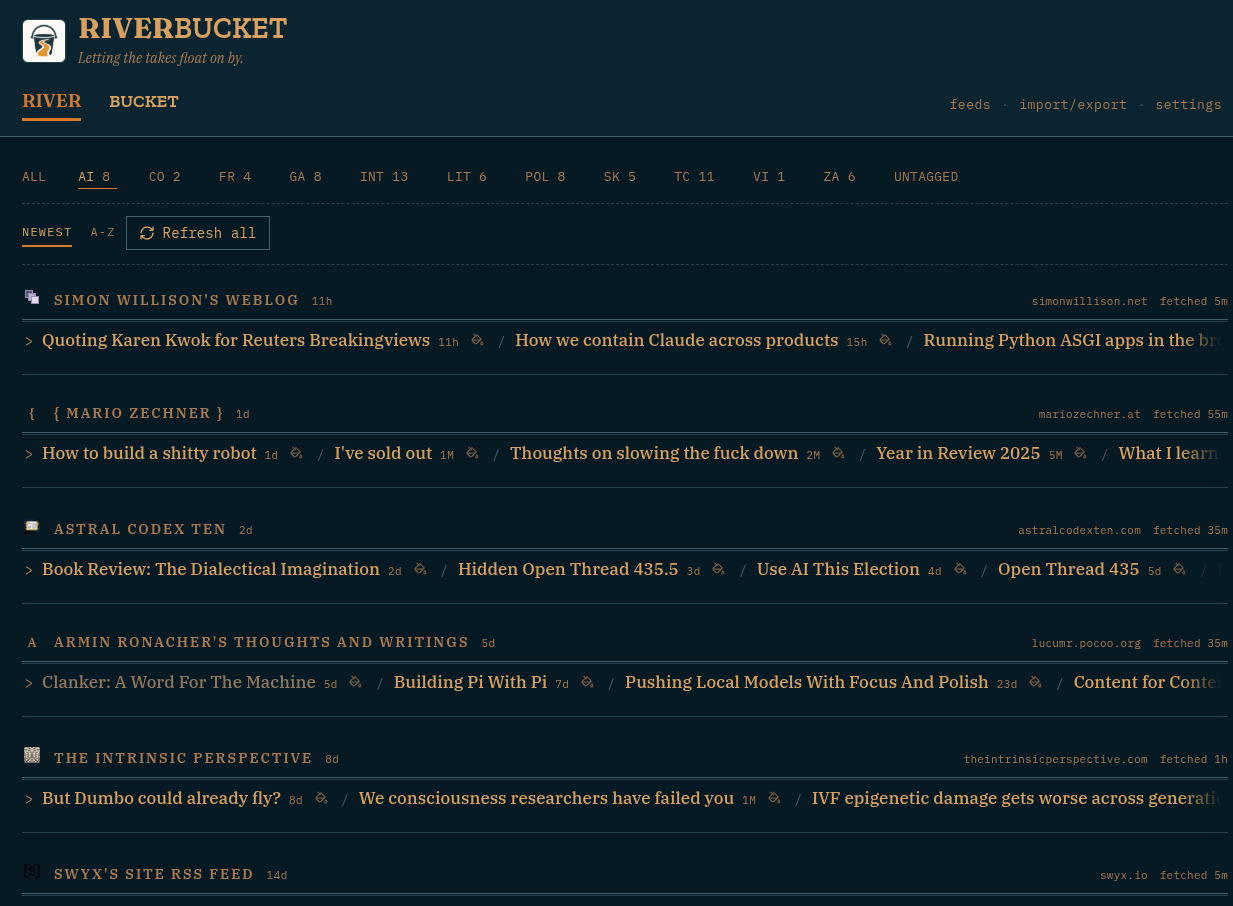
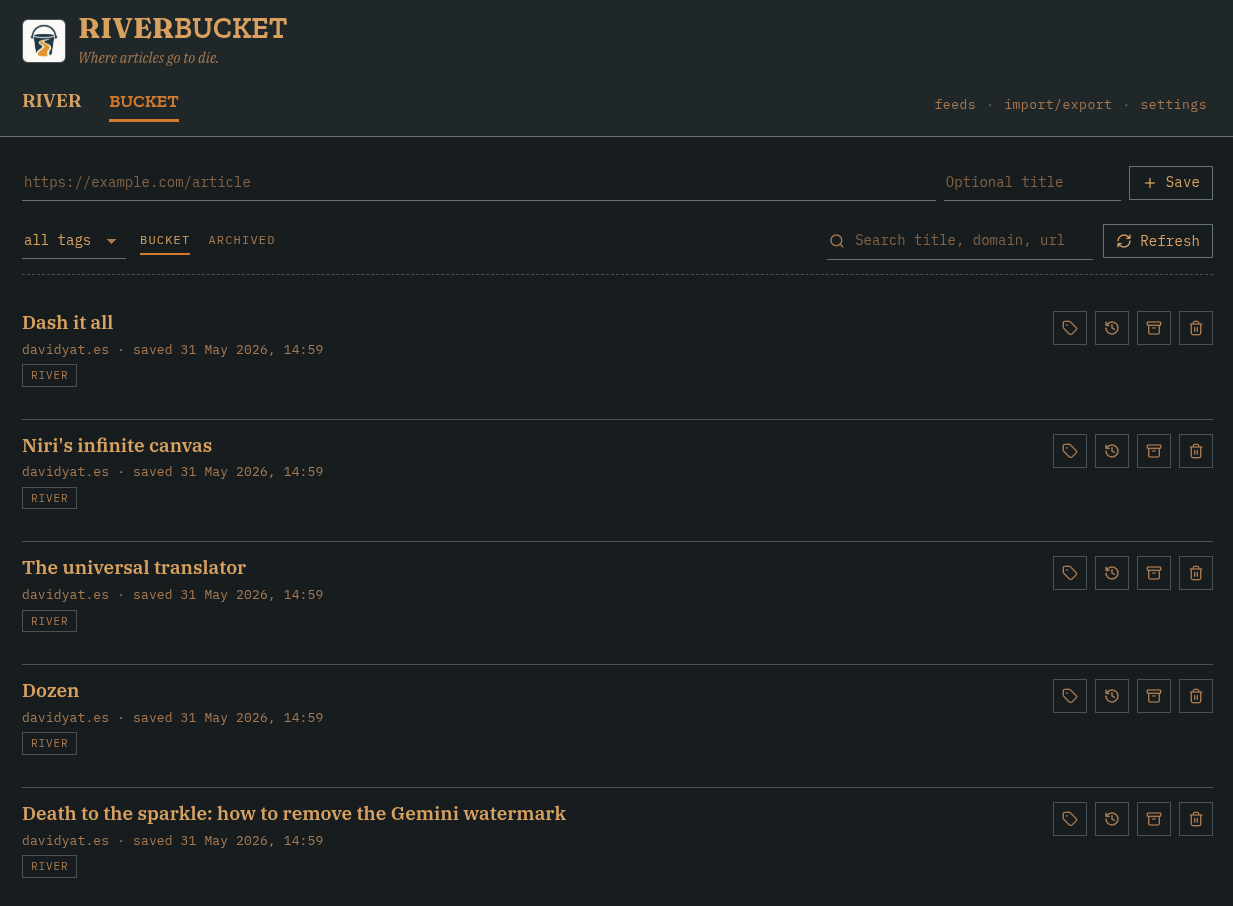
# Impetus
Regular readers are likely acquainted with my particular opinions about following and reading blogs. Prior to developing Riverbucket, I used Fraidycat for following RSS feeds. I was also a heavy user of Pocket for saving articles to read later, until its shutdown in July 2025. After that, I used Pinboard for a time.
In my article about Fraidycat, I went on at some length about how much I liked that it was not designed to mimick an email inbox. It just shows you links to the most recent 5–10 articles for each feed you subscribe to, without trying to track which ones you have or haven’t read, show content inside the app, or keep a record of older items. This is the way I prefer to browse of the feeds I subscribe to, but there are some exceptions where I want to make sure I receive and read every article. For these elect few, I set up IFTTT workflows to automatically save new items to Pocket, and then to Pinboard.
The following pain points arose from this setup:
- In my Pocket days, I got very used to saving things to read later by right-clicking a link and choosing “Save to Pocket”, facilitated by the Pocket webextension. No equivalent to this feature exists in the Pinboard Tools extension, and its absence was a repeated source of low-level frustration. I also found the extension generally sluggish.
- While I dearly love Fraidycat, its last public release is a Manifest v2 webextension. Currently, all my browsers are configured to support these extensions, but Chromium may remove these legacy compatibility flags at any time, so at some point it will stop working for good.
- When I started using Fraidycat, all my browsers had Chrome Sync and would thus sync the extension’s saved feeds between devices. For various reasons, this is no longer the case, and I’ve had to either manually export and import settings between browsers or live with a divergence in watched feeds.
These low-level frustrations and concerns have been in the back of my mind for a while. At the front of my mind, I’ve been doing a lot of work with coding agents since the beginning of the year, just like everyone else in the tech industry. This has enabled me to build all kinds of software that would not previously have been worth the time investment.
These two things came together when I saw this comment on Hacker News:
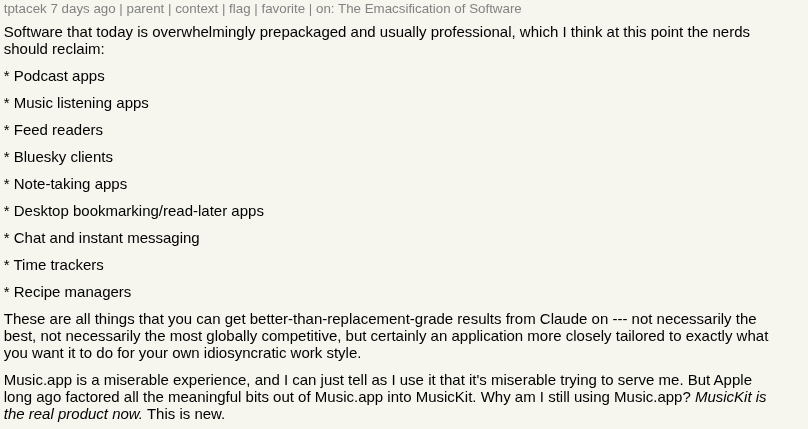
Because tpatacek specifically included feed readers and read-it-later apps in his list of things you should vibe-code for yourself, I realised that I had a very achievable and quite fun method for resolving my blog-reading frustrations right at my fingertips. And so Riverbucket was born as a custom replacement for what I’d previously been doing with Fraidycat, Pinboard and IFTTT.
# The River and the Bucket
As its name might imply, Riverbucket is split into two halves:
The River provides an overview of the most recent items published by RSS feeds you’ve decided to follow and The Bucket is a list of items you’ve saved to read later.
Feeds update every so often, and you can give each feed one or more tags, allowing filtering. The interface is heavily inspired by Fraidycat – it is a river, you’re supposed to watch the content float on by and click links to what you’re interested in. But you can also dip your bucket in now and then, or even configure individual feeds to auto-bucket new items (so long IFTTT!).
Bookmarked items will mostly be articles and blog posts, but can be any web page, in principle. You can save new pages using the controls at the top of the interface, or through the companion webextension, which provides functionality for saving the current page and a right-click menu item for saving links. One of the buttons on each item will search the page on the Wayback Machine, but no other attempts are made to back up or archive content.
# Blog-post driven development
This project was developed through a series of prompts, the first of which was this ChatGPT generated specification. The prompt for the specification was as follows:
I would like to write my own software for following rss feeds and bookmarking stuff to read later. Here are some things I've written about the subject in the past:

https://davidyat.es/2020/03/14/reader-modes/
https://davidyat.es/2020/09/05/fraidycat/
https://davidyat.es/2024/03/29/substack-ux/

I'd like a lightweight app hosted on Cloudflare with as little server-side logic as possible. Probably two main screens: the river RSS subscription view and the bucket bookmarks view.

I don't want a reader interface, just links to external sites. Maybe we could incorporate links to archive.org for dead pages, but that doesn't have to be in 1.0. I also don't want an unread count or anything like that for the RSS view, but the ability to manually save items from the RSS river to the read later bucket is a good feature.

There should also be a companion webextension that allows subscribing to RSS and saving things to read later. the ability to right click a link and save it to read later is crucial.

Read my articles, consider all this, and help me flesh out a spec for this project.
The title of this section is a bit facetious – I’m not sure that including the blog post links achieved much that I couldn’t have achieved with a few sentences, but I kind of like the idea having a coding agent build software based on my cantankerous rants. Something I liked was that ChatGPT converged on the name Riverbucket, which is what I also had in mind, just from words used in the third paragraph.
I could have tweaked the generated specification manually to have a better chance of one-shotting the app, but I’ve always been more of an iterator. Once the initial version of the app was built from the generated spec, I added and changed things piecemeal. My general process for this, across all my agent-coded projects is this:
- Open Codex in Plan mode and give a brief description of the feature I want. This can be anything from a single sentence to a few bullet points.
- Let Codex churn out a plan, answering any questions it asks.
- Read the plan, and ask for adjustments if necessary.
- Implement the plan. Usually I clear context here.
- Manually look at the results. If there are small tweaks to make, ask for them.
/clearand go back to 1 for the next feature.
Most of my chats are pretty short – I have not really seen much practical use for the one-million-token context windows. If I don’t have a clear idea of the feature I want, I’ll do some brainstorming with the model before the planning step. Oftentimes, instead of a new feature, I might ask for a code refactor, or a security audit, or for the agent to hunt for bugs and fix them, but those processes all have a similar shape.
# Philosophy and future development
Riverbucket is all about making it possible to browse the web like I did in ‘07: text-first and with no content display algorithms more complicated than reverse chronological order. I’ve intentionally avoided unread counts, reader modes, content archiving, AI summaries and digests, and content discovery/recommendations.
Additional features I’m experimenting with include:
- Video transcripts
- Inspired by this vibe-coded app and the Obsidian Web Clipper, I think it would be great to save a readable video transcript when adding videos to the Bucket. I’m not even interested in the tracking functionality; I just want to be able to skim-read videos people send me so I don’t have to sit through them. This would be going against the app’s present policy of storing links rather than content, but it would also contribute to the higher purpose of allowing me to pretend it’s 2007.
- Additional subscription types
- Right now, only RSS/Atom feeds are really supported. This allows for quite a wide range of subscriptions, including to Youtube channels, but I’d like to add the ability to subscribe to high-signal Xitter accounts, Indieweb h-feeds, and maybe I’ll even hold my nose and add JSONfeed.
- Platform-agnostic architecture
- Currently, Riverbucket is built for Cloudflare Workers, Cloudflare Queues and the Cloudflare D1 database. I’ve been working with this stack a lot lately and come to quite like it. I don’t really like the idea of being locked onto a single proprietary platform, but I also don’t presently have a need to support a different platform. But should the need arise, I’m confident that my coding agents will make short work of any necessary porting.
# The spirit of the age
Like an increasing amount of software today, Riverbucket is primarily built for the use of one person, to the extent that I was unsure of the value of open-sourcing it. Most people interested in an application like this are likely capable of vibe-coding their own one that’s more in line with their personal idiosyncrasies.
But just as coding agents have made it easier to put something like this together, they have also made it easier to slap a license on it and release it to Github. And so, in the spirit of “why not?”, I give you the clanked-out source code of Riverbucket.