 David Yates.
A few months ago, I wrote about the deep weirdness of LLM technology, and how we’re all still learning how to approach its outputs. The marketing and popular perception of these models is that of a helpful robot assistant, and leaning into that characterisation is also a core part of what makes the technology useful in ways that straightforward text completion models weren’t. By pretending to be a robot assistant, modern instruct models/chatbots are able to perform many digital tasks one might want a (digital) robot assistant to perform.
At the same time, thinking of LLMs as science-fictional robot assistants can lead us astray when using them, or even when discussing them. In my last post, I used the example of someone on LinkedIn who got mad about ChatGPT “ignoring his instructions” regarding which files it was and was not permitted to access on his Google Drive. Another illustrative example is the case of a GitHub user who submitted a large, AI-authored pull request to an open-source repository. When asked why the new code files included comments attributing authorship to a real person, the pull requester cheerfully replied that it was something the AI decided to do, and he didn’t question it – he deferred to the superior intellect of the logical robot from Star Trek that now lives in his computer.
Not wanting to take responsibility for things is a very human impulse, and one we’ve been using computers for ever since they were invented. But “the computer said it, so it must be true” is a very different statement before and after the widespread adoption of LLMs. The general notion of what computers do and how they work – logic, precision, determinism – just does not apply to these strange new word calculators that rotate the shapes of language heedless of what that language may signify.
Sorry human, you’re still in charge.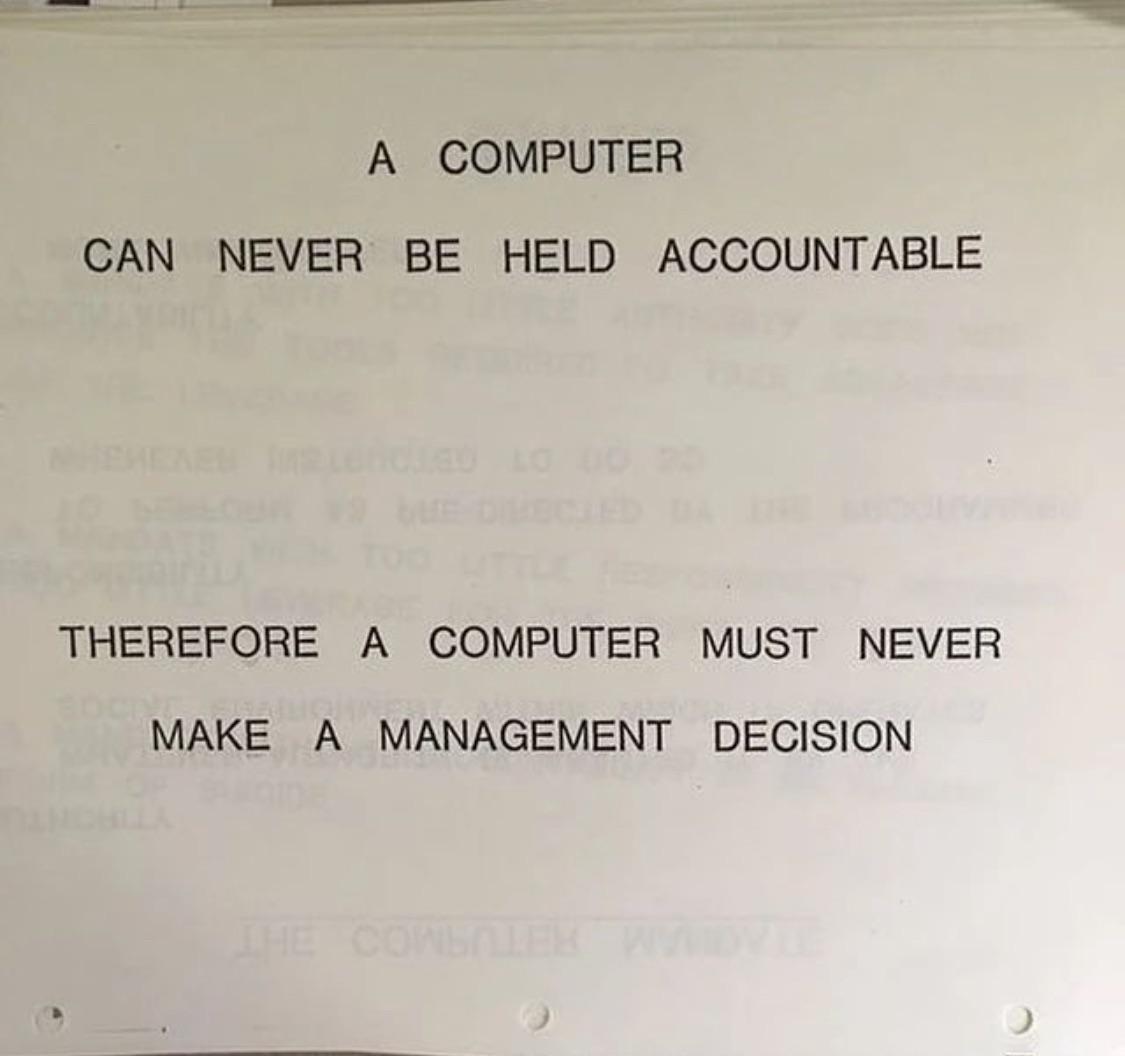
Of course, that’s precisely what makes them so powerful and useful for radically different tasks than we used deterministic computer code for. The lack of determinism and somewhat unpredictable nature of the outputs means we can use LLMs to perform an enormous variety of messy tasks that were previously very difficult to automate. One good example is web scraping: to extract specific information from a website, you previously needed a large amount of highly specific and brittle parsing code for the exact page you wanted to scrape, which you had to manually update if the page changed its layout. Now you can just tell an LLM to get X info from Y page, and it’ll figure out the finicky details. And you can ask it again in a year’s time, after the subject website has been completely redesigned, and it’ll figure out the new finicky details.
In my day job, I often used to say that the main value of penetration testing over automated scans was that only humans could find business logic flaws, because automated tools don’t understand context. A static analyser can tell you to replace your SQL statement string interpolation with parameterised queries, and HTML encode untrusted content included in pages, but it can’t figure out that users shouldn’t be able to change each other’s profiles, or transfer money out of each other’s bank accounts – at least not without a bunch of very specific setup. LLMs, on the other hand, can do these things, for the same reason they can analyse data and do basic literary analysis: we have managed to create intelligence (or something like it) through very high-level pattern matching.
But creating intelligence does not mean that we’ve created conscious beings, or even that we’ve made robots capable of replacing humans in every job. It just means that we have new tools – very powerful ones with previously unimagined capabilities, but tools nonetheless. And that’s how I want to think of them. I have a tool called ls that lets me list directories, and I have a tool called claude that lets me translate English descriptions into computer code.
Anyone with even a passing familiarity with how LLMs work will know that their basic functionality is predicting how to continue a piece of text they’re given. Plenty of comparisons have been made to IntelliSense in programming IDEs, Markov chains, and your phone’s autocomplete, and they’re not wrong. The chat interface that remains the primary means of interacting with these models is a clever trick: every time you send a new reply, the entire chat transcript is fed back into the model, including the initial system prompt, the output of previous tool calls, and “memories”.1 The “reply” is then produced by continuing the transcript.
But I’ve lately been thinking of the LLM not as autocomplete, but as a translator. The most obvious application of this happens when you ask a model to translate some text into another language,2 but it also happens when you ask the model to write you a script – it’s translating your natural language specification into computer code. We can apply this analogy to just about any input and output of an LLM, and it really clicks into place when you think about how the model takes your input and does intense mathematical operations on it to extract a suitable response from its latent space.
Another thing I like about the translator framing is that it emphasises the importance of the user input. As with everything else in computers, when you put garbage in, you get garbage out. Hence slop. The vast majority of visibly AI-created content is rightfully called slop, but it’s always been my contention that this is the fault of the users, not the AI. A computer can never be held accountable.
Publishers of slop are often pilloried with phrases like “you didn’t make that, the computer did.” While intending to disparage the slop purveyor, it also removes their accountability. As soon as we start saying that the computer made something, we start to excuse its obvious flaws and blame them on something that cannot take responsibility. While these tools do have limitations, most of the common flaws in anything made with AI can be fixed through more thoughtful and skilled usage of the AI tools. But if you want to improve your output, start by taking responsibility for it.
All that said, I don’t want to place all the blame on users – some of it rests on the shoulders of OpenAI and its competitors. ChatGPT was built from the start as a mass-market consumer product. OpenAI’s roots are in the Y Combinator B2C world of customer growth, and that means simple interfaces. ChatGPT is synonymous with AI in the public mind, and most other AI companies have copied its basic interface. The thrust of most marketing copy also plays up the helpful sci-fi robot angle.
This goal of user-friendliness, however, has meant that the majority of people’s experience of LLMs and related generative AI tools is mediated through a platform that does not showcase the full potential of the technology. It doesn’t help that most AI integrations in other applications are hastily slapped-on chatbots that end up just being worse versions of ChatGPT.
Nowhere is this truer than in image creation.
# Image creation
This Forbes article from October 2025 describes the author’s frustration with using ChatGPT, Gemini, and Grok to make images. An illustrative quote:
Useful? Not really. Fun, maybe. But not useful yet. When you read the above, and follow all the PR hype, the typical business user thinks: Wow! I can fire my marketing people and instantly create “high quality” and “useful and beautiful” images. Except for one thing: you can’t. These things just don’t work very well.
OpenAI, Google, and xAI have all come out with newer models since this article was written, but they’ve all been incremental improvements rather than step changes. Google’s Nano Banana Pro and OpenAI’s GPT Image 1.5 are generally considered the most powerful and capable image generation models, with far better prompt understanding than even top open models like FLUX.2 and Z Image. But they also lack the flexibility and configurability that would allow them to be fully integrated into the powerful tooling that’s available for open models.
I think this is because of two things: (1) image (and video) generation is fundamentally not a priority for top AI companies, and (2) top AI companies want to keep their user interfaces simple for the consumer market. As a result, the best models are trapped in the worst interfaces, so most people are unaware of the kinds of things you can actually do with AI image generation beyond prompting.
Back when Stable Diffusion first came out, I wrote about specific uses for setting specific seed and CFG values and using different samplers, things that still have no equivalent in the interfaces we get for SOTA closed models. Local image generation also allows you to specify the exact dimensions of the image output, rather than having to hope that ChatGPT/Gemini will heed the request for landscape/portrait in your chat.3
But the local-exclusive feature with the most potential in those early days was image-to-image generation (often styled as img2img). This means providing an input image for your generation, along with all the other things like prompt, seed, and CFG. Along with the input image, you must supply a denoise percentage, which tells the diffusion model how much to change it.4 Some examples:
Original lousy cat drawing
30% denoise
50% denoise
75% denoise
The key takeaway here is that, starting with an input image and a prompt, we can generate different output images that exist on a sliding scale between the input image and the model’s interpretation of the prompt. This is a straightforward example in which the prompt and the input image are aligned, but we could also make the prompt something totally different, and slowly transform the cat drawing into another thing entirely.
The first examples of this showed people doing this with simple drawings like this, but of course you can do it with any image – including AI images. And you don’t have to do it with the whole image at once – you can target just one section of an image. This is called inpainting.
The most naive approach to inpainting is just to select part of the image and change the prompt, but it tends to work a bit better if you give the denoiser some visual guidance. Below, I’ve taken the 75% denoise image above, drawn a line to show where the cat’s foreleg should go, and inpainted the relevant section of the image.
Manually drawn guidance Inpainted forelegs

These techniques open up a whole world of human-guided, AI-assisted image creation possibilities, which expanded even further with the later introduction of ControlNet. You could alter the style of whole images; transfer poses between characters; add, remove and refine details; and even blend a crude collage into a cohesive whole. The public only really started getting a taste of this when ChatGPT’s multimodal image generation debuted in March 2025.
But in the early days following Stable Diffusion’s public release, actually realizing these possibilities was quite a tedious process even for enthusiasts. Much time had to be spent moving between image editors and command-line scripts, and later on between image editors and Gradio web interfaces. The graph-based web interface ComfyUI eventually became the de facto standard for image (and later video) generation power users, with an enormous and ever-growing base of support for different models and the tooling around them (which I covered in some detail in this post from late 2023).
A simple ComfyUI workflow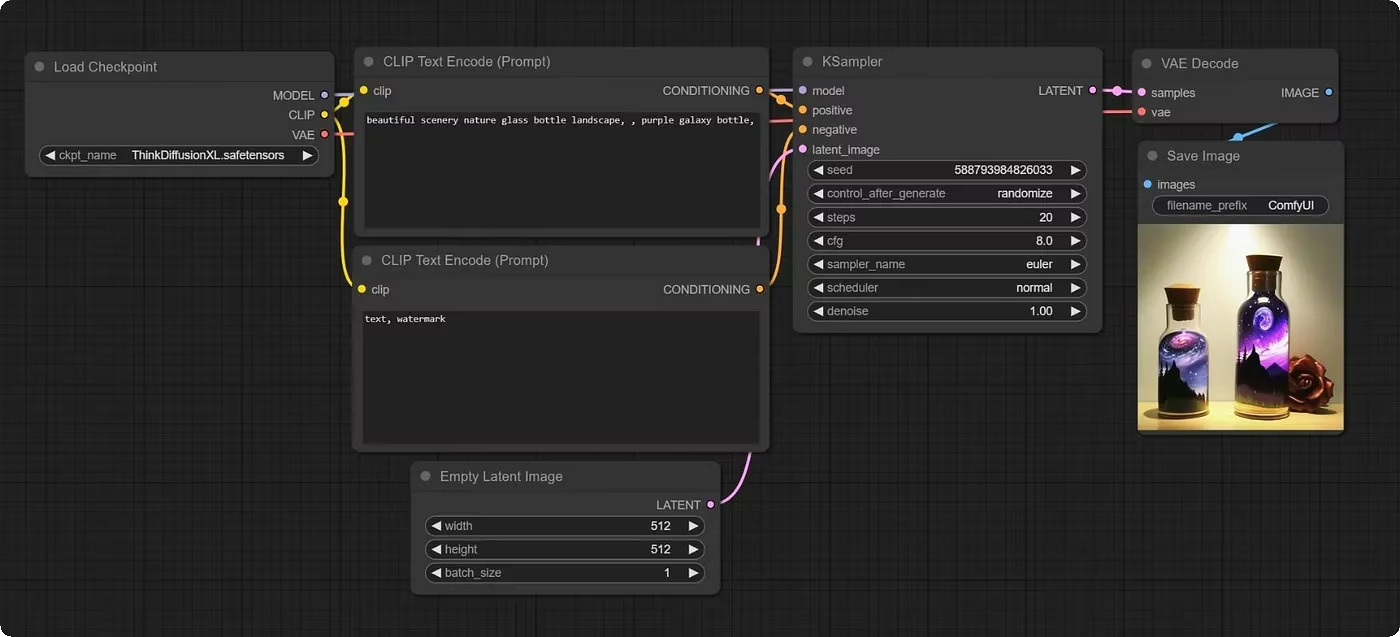
ComfyUI is a very powerful tool – not just for image generation, but for video and audio as well – but the graph programming interface fundamentally lends itself more to workflow automation than creative iteration. Nevertheless, it’s a lot more capable than the chat-based image creation and editing OpenAI and Google have given us. Late last year, Figma acquired Weavy, a cloud-based, more user-friendly version of ComfyUI, for $200 million.
But the tool that I believe truly showcases the creative potential of diffusion-based image generation is Krita AI Diffusion, a plugin for the open-source painting program Krita. Leveraging ComfyUI as a backend server, it gives Krita a suite of very well-thought-out and ergonomic tools that go far beyond Photoshop’s Generative Fill.
Krita AI Diffusion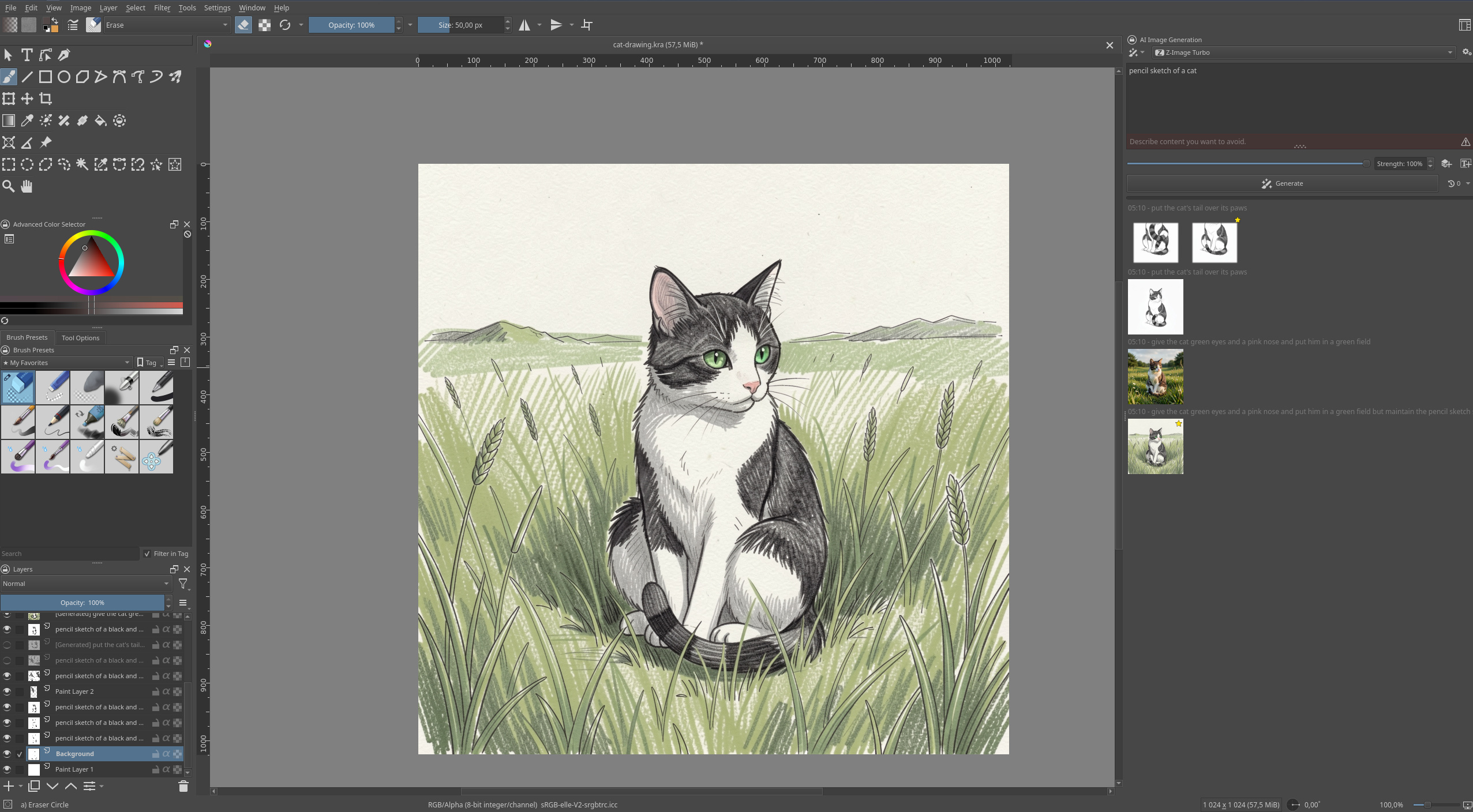
With Krita AI Diffusion, you can use a variety of generation models to create and refine the same image as much as you like, in as much detail as you want. You can start with either a generation or your own drawing or photo, draw lines to guide successive img2img and inpainting steps (all of which can be placed on their own layers), and you have all of the standard editing tools Krita provides: selections, different brushes, smart patch, filters and colour adjustment, etcetera. And it gets even better when you combine it with the plugin author’s other plugin, Krita Vision Tools, which allows you to select by object for more precise inpainting.
The recent proliferation of Edit Models also means that you can apply changes to images (and parts of images) through prompts, just as you would with Nano Banana or ChatGPT – this replaces some of the tasks that previously would have required extensively guided inpainting and ControlNet models, but you can still fall back to those options if the Edit model doesn’t work or you want more precise control than it allows.
The earliest attempts at integrating local image diffusion models into paint programs were plugins that just replicated the existing Gradio interfaces in a panel on the side, much like how many programs that tout AI integration even today just have a chatbot interface in the sidebar. Krita AI Diffusion goes beyond that to make the AI assistance a truly integrated part of the program, allowing the user to decide exactly what they want to do manually and what they want the AI to fill in. It gives me hope for the future of AI interfaces, once we get past the idea of just shoving a chatbot in the corner. But I think most of these kinds of specialised interfaces will be aimed at power users, so they may not ultimately help the Forbes-reading businessman rise to the aspirations OpenAI’s marketing department has for him.
# Programming
Unlike image generation, programming is a focus of top AI companies, and we’ve seen specialised power-user interfaces for AI-assisted programming with top-of-the-line closed models from the start. LLMs have been useful as programming assistants in some capacity since the release of GitHub Copilot in mid 2022 – predating ChatGPT by several months.
In the beginning, LLMs were integrated into programming IDEs to provide a slightly magical, slightly annoying, and totally non-deterministic combination of IntelliSense and snippets – GitHub Copilot was the first. Glimpses of the future could be seen in how it allowed users to type up a docstring from which it would autocomplete the described function.
When ChatGPT came out in November 2022, a different approach to writing code became popular. It looked like this:
- Ask ChatGPT to write some code.
- Copy-paste the output from the Markdown code block into a local file.
- Run the local file.
- If it produces an error, paste the error into the chat. If it doesn’t do quite what we wanted, request a change.
- ChatGPT rewrites the code, and we return to step 2, repeating until satisfied.
In time, GitHub Copilot added a chat sidebar to VS Code, and ChatGPT gained the ability to run the code it wrote for users in a container. This latter capability was enabled by tool use/function-calling. As I keep repeating, the chatbot interface is a trick – each response from a model requires the entire transcript to be fed back in. But that’s not all we can do with the transcript – we can also train the model to output specially formatted commands asking to run tools, and then parse those commands into command-line commands, or API calls, or whatever else we want, and run them. We can then append the responses of those tool calls back onto the chat transcript, just like we do with user responses. This allows the models to take actions and receive feedback from those actions. This is where we move from chatbots to agents.
A simple AI agent is merely a way to automate the five-step process above: write code, run code, see errors, fix errors, run code, repeat until no more errors. Every programmer is intimately familiar with this loop. But if a model can use tools to write code and run it, it can also use tools to do other things: read files, run linters, install packages, fetch webpages, and so on. The coding agent started out as just a way of automating a multi-loop debugging process, but with smart enough models and big enough context windows, it eventually became capable of translating a natural-language feature specification into a functioning code addition to an existing project, or a whole new project – and then committing the changes to source control and deploying them to a remote server. And that’s how we advanced from autocompleting functions to autocompleting significant chunks of a software engineer’s job.
But someone still has to write the specification. A human being still has to know what they want to build, and unless it’s something incredibly generic, they have to go into detail about it.
One of the benchmarks I like to use for different coding models and agent harnesses is “write a Tetris clone in X language/framework”. This is a project that novice programmers have been doing for decades, so it should be well represented in the training data. When given this prompt (with X = Love2D) in plan mode, Claude Opus 4.6 asks me if I want a classic version of the game or a more modern implementation with things like next piece preview, piece hold, and ghost pieces. I asked for the more modern version, and it spat out a fully functional, pleasant-looking Tetris clone. A second prompt changed one of the controls to something more to my taste, and then I played a few games.
Claudetris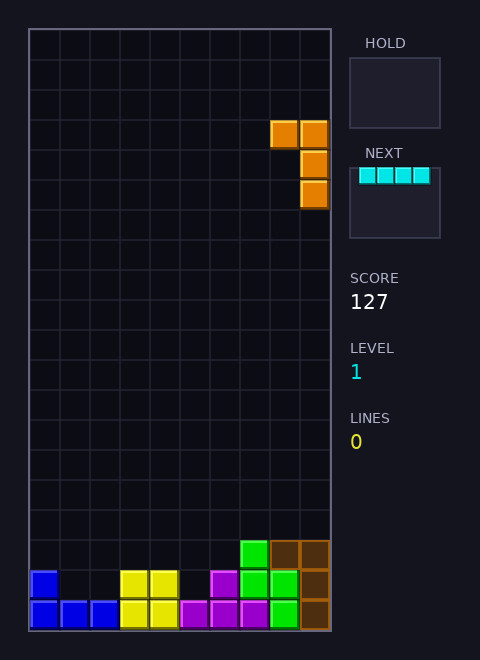
The only bug in this one-shotted Tetris game was that you could keep turning a piece pretty much forever after it landed, provided you were quick enough on the keys. That was easily fixed with an additional prompt.
This is a fairly impressive result in some ways and would have been unthinkable a few years ago. It’s a nice toy demonstration of the model’s capability, but it’s also pretty useless. There are a million other ways to play Tetris – it’s even built into Emacs – and there is nothing interesting or novel about my one-shotted implementation. I have merely translated “A clone of Tetris with the features common to modern versions of the game” into Lua code. But doing so took less than five minutes. And with additional prompts, I can make whatever changes I want.
One of the most common criticisms of LLMs is that, as fancy autocomplete engines trained on a giant corpus of existing text, they cannot create anything new and will trend towards outputting the average of everything they’ve ingested. I tend to agree with this, but I don’t see it as much of an argument against using AI tools. I don’t need Claude, ChatGPT, or Flux to be original; I just need them to do as I ask.
Much criticism of modern AI tools is made with this weird pincer manoeuvre, where the LLM gets called out for being dangerously capable and totally useless at the same time. It’s not capable of reading your mind and doing all your work for you, so that makes it useless. And at the same time, it’s good enough that you can outsource all your thinking to it and let your brain rot, something so tempting that you have to actively resist using anything with the letters “AI” in its name.
The commonality between these criticisms is that they assume that any process involving AI will intrinsically lack any human effort, often because they are thinking of LLMs as embodied robots designed to replace human beings. In other words, they’re falling for the marketing hype.
Create an image or write a program with AI, and they’ll say that you “commissioned the computer to do the work for you.” This analogy holds for one-shotted AI creations like my Tetris game example, or the worst varieties of AI slop images, but such things represent the most basic and boring things you can do with AI tools, the ground floor of this technology’s enormous potential. If I open Blender, place a single monkey head, and call that a scene, it might also be fair to say that Blender has made the scene for me. But I’m interested in doing far more than that.
To make interesting and worthwhile things, you need to put in effort, regardless of the tools you’re using or what their most breathless marketing says. And guess what? That’s entirely possible! You are allowed to send more than one message to the LLM. You are allowed to tweak your script or alter your image, and in many ways, AI makes this much easier to do than it ever has been before.
Continue along this line of argumentation, and someone will eventually say, “Well, if you have to spend hours making whatever it is anyway, why not just do it all yourself?” Perhaps they’ll back that up with an anecdote about a time they tried to get ChatGPT to do something over multiple turns and eventually got frustrated and gave up. Or maybe they’ll cite that study about AI assistance making people feel like they’re more productive while actually being less productive.
There are things that LLMs are good at, and things they’re bad at. There are also learnable skills that make you better at getting desired results out of LLMs – prompt engineering, context engineering, agentic engineering, these are all real emerging domains that consist of more than a few tricks. AI-assisted image creation – the newest form of synthography – is too. AI tools require skill to use well, just like every tool humanity has ever created.
Many of the arguments about AI-assisted programming have the same shape as the tiresome arguments I’ve been reading and occasionally having for decades about whether you can claim to be a real programmer if you don’t manually write everything in machine code.
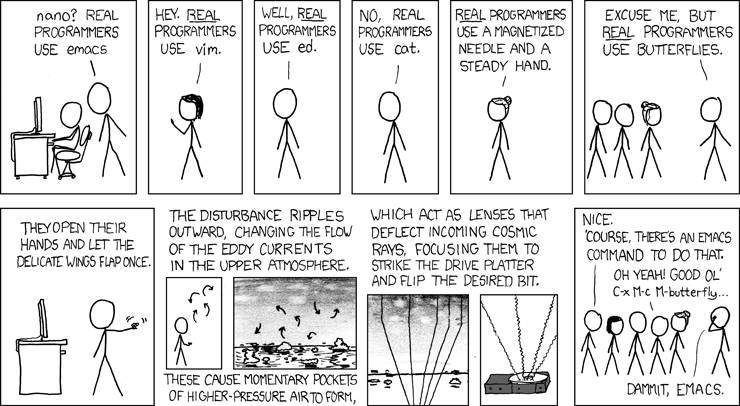
I’ve written before about learning to program with GameMaker, a game engine originally developed as an educational tool. Even on forums centred around this program and games made with it, you’d have the occasional Real Programmer come in and tell everyone they sucked for not writing all their games in engines they’d custom-built using C++. Engage them on this topic for long enough and they’ll make vague assertions about how limited your creativity becomes in the stultifying straitjacket of a tool that comes with the built-in ability to render and move 2D shapes on the screen. If more people wrote everything from scratch, went the argument, we would see far more originality in games. You can’t make an original game in GameMaker, went the corollary (often explicitly stated) – it will just be the same as everything else made in GameMaker. But in all these discussions, I never saw any actual conjectures or examples of what this vaunted originality might look like.
I’m writing this post using a CMS I’ve been building with Claude Code for the last month or so. The process of building this CMS has involved many hundreds of conversations with Claude. Initially, these concerned the overall architecture of the CMS, and then they got into individual features. By starting with a skeleton and gradually adding features, I’ve been able to create a functional CMS for static Hugo websites that has exactly the architecture and featureset I want. Nothing like this exists elsewhere – otherwise I wouldn’t have had to build it.
My vibe-coded CMS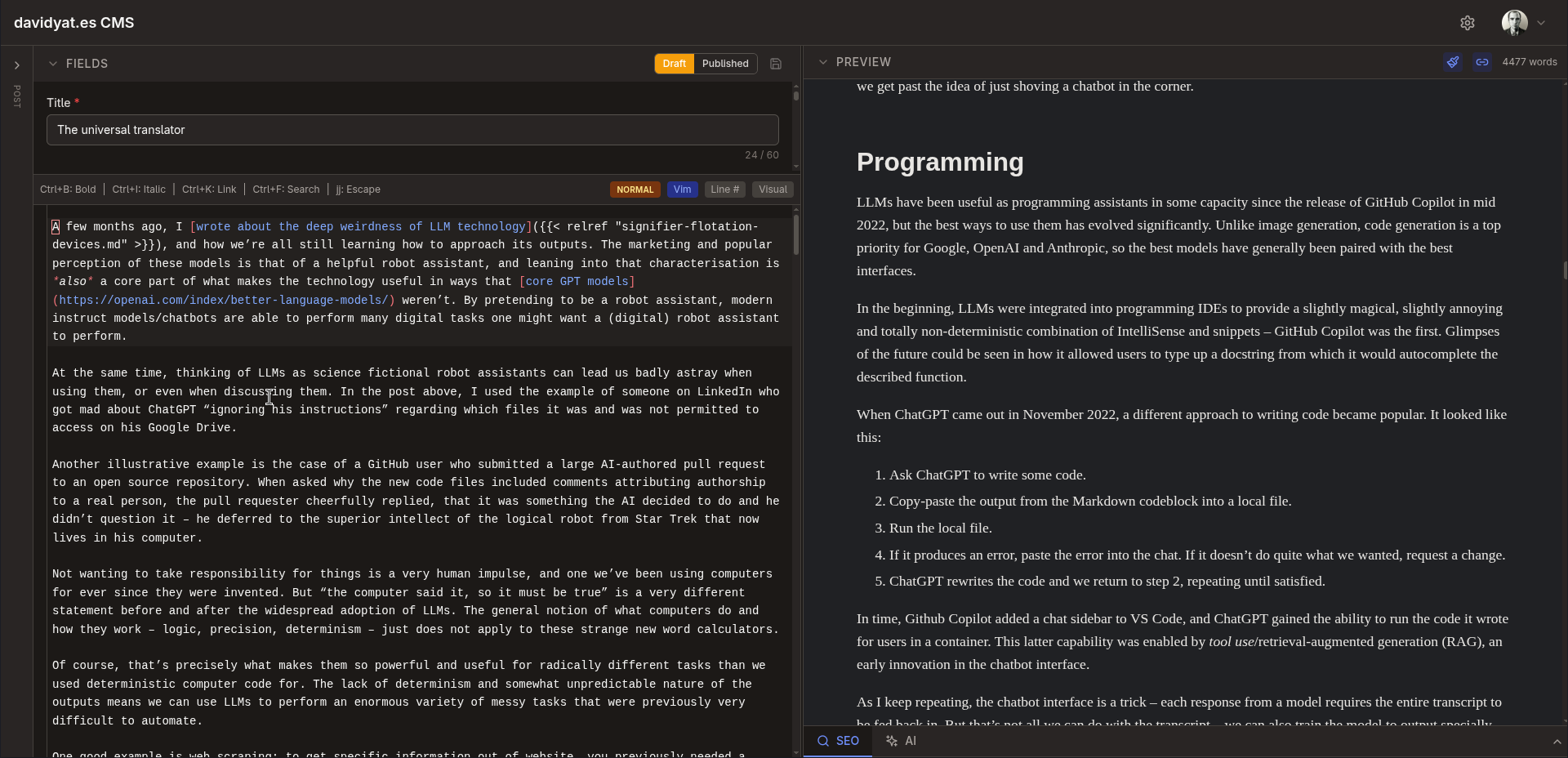
But there’s nothing novel about the concept of a CMS. All the individual components are things that already exist, and most of the glue code is similar to other glue code in applications that use some of the same components. The same is true of the majority of software, and the majority of everything else you might want to create.
This is not to denigrate the value of understanding how code and computers work. I would be far less effective at vibe coding without extensive experience of traditional programming and technical work. If you’re interested in doing technical work in a technical field, there is no substitute for deep understanding.
Knowing something about how good software development works helps a lot when guiding an AI coding agent—the tool amplifies your existing knowledge rather than replacing it.
Benj Edwards, 10 things I learned from burning myself out with AI coding agents
I just don’t consider the act of hand-typing code in as low-level a language as possible a sacred act that inherently confers some special status upon the output. I do not subscribe to the labour theory of value.
The 2008 film Flash of Genius dramatises the life of Robert Kearns, the inventor of the intermittent windshield wiper. After patenting this design, he showed it to Ford and proposed they manufacture it. Ford rejected his proposal but later came out with a similar design, prompting a prolonged patent dispute which Kearns eventually won, though he arguably ruined his life in the process.
One particular scene from the film that’s always stuck out in my mind involved a lawyer for Ford arguing that the intermittent windshield wiper cannot be considered a novel invention, as it is merely an arrangement of pre-existing electrical components, just as the lawyer’s grandmother cannot be considered to have invented the cookies she bakes from ingredients and a recipe.
Kearns’s response to this argument is to bring in a copy of A Tale of Two Cities and a dictionary. He then reads out the famous first sentence, stopping after every word to see if it’s in the dictionary, which it is. By the Ford lawyer’s logic, he argues, A Tale of Two Cities is not a novel work as Dickens did not create any new words – he just arranged existing English words in a new order.
Greg Kinnear in Flash of Genius (2008)
So maybe LLMs can’t create anything new. That doesn’t mean humans can’t use them to arrange pre-existing things in new ways – and that’s what most people call creativity, most of the time.
A very careless plagiarist takes someone else’s work and copies it verbatim: “The mitochondria is the powerhouse of the cell”. A more careful plagiarist takes the work and changes a few words around: “The mitochondria is the energy dynamo of the cell”. A plagiarist who is more careful still changes the entire sentence structure: “In cells, mitochondria are the energy dynamos”. The most careful plagiarists change everything except the underlying concept, which they grasp at so deep a level that they can put it in whatever words they want – at which point it is no longer called plagiarism.
Scott Alexander, GPT-2 as [a] Step Toward General Intelligence
# Writing & knowledge work
In the conclusion of my first Stable Diffusion post, I wrote that I was much more interested in image generation than text generation, because I can write my own text. Thus, I was very underwhelmed by the earliest versions of ChatGPT. You could ask the model about all kinds of things and get a confident, comprehensive answer, but because that answer was just pulled from somewhere in the model’s weights, you had a constant fear of hallucination, and you ended up needing to confirm the whole thing with a good old-fashioned web search. Ted Chiang famously called ChatGPT a “blurry JPEG of all the text on the Web”, and when he wrote that in February 2023, he wasn’t wrong.
These days, we have retrieval-augmented generation and agentic tool use. Most modern LLMs are now trained to use their web search tools to answer questions and will provide citation links to discovered sources. This does not mean that hallucinations are a solved problem, but they’re much less frequent and much easier to correct. If you’re not convinced, go to Google AI Studio and try asking it about something niche or very current, first with Grounding with Google Search turned off and then with it turned on. These capabilities are what make LLMs useful for not just programming but also searching the web and performing many other kinds of computer-based tasks.
That said, I’m still not big on using LLMs to write, at least not in any non-disposable capacity. I like programming with LLMs because they handle the boilerplate for me. But if I find myself writing boilerplate I’d prefer to automate, my solution is to stop doing that.
I’ve experimented with AI-generated writing, but mostly to underwhelming results. In my experience, getting LLMs to rewrite prose produces an averaging effect: the LLM strips out spelling mistakes and awkward grammar with just as much enthusiasm as it strips out the things that make good writing distinctive. I’ve tried a few experiments where I’ve generated some text and then edited it into my own voice, but I always end up coming back to those pieces later and picking out awkward LLMisms I missed. So I now keep the LLM output entirely separate from any writing I care about.
I will still use LLMs to get first-pass feedback on a piece of writing and to find typos and so on. It’s a useful editor as long as you know not to take its compliments too much to heart or to treat its every suggestion as essential. A little bit of prompt engineering here goes a long way: while a generic request for feedback will produce a lot of fawning and maybe some minor criticisms, asking the LLM to write potential Hacker News comments for your technical post will usually actually highlight flaws in your argument. You’re roleplaying with an autocomplete here, so you’ve got to give it the right character.
But there are some interesting things happening in the AI writing space. A few weeks ago, I read and quite enjoyed “Ablation”, a short work of science fiction written from the perspective of a large language model, by a large language model (an OpenClaw instance named Shen). It is a coherent piece with a consistent authorial voice that builds and maintains a logical sequence of events over its three thousand-word length. The prose is not entirely free of LLMisms, but as it’s written from the perspective of an LLM, this works in its favour.
The bot’s operator, James Yu, maintains that he did not manually edit it aside from fixing some formatting issues, but also notes that the posted story is (roughly) the fourth draft. Yu has posted other stories by Shen, such as “Do Not Confirm” and most recently “Records Management”. He’s also hinted at having fed many traditional stories to Shen as a tastemaking process. And although he avoids making direct edits, he guides the stories through multiple rounds of feedback – a process not unlike building software with a coding agent.
The opening sentences of “Ablation”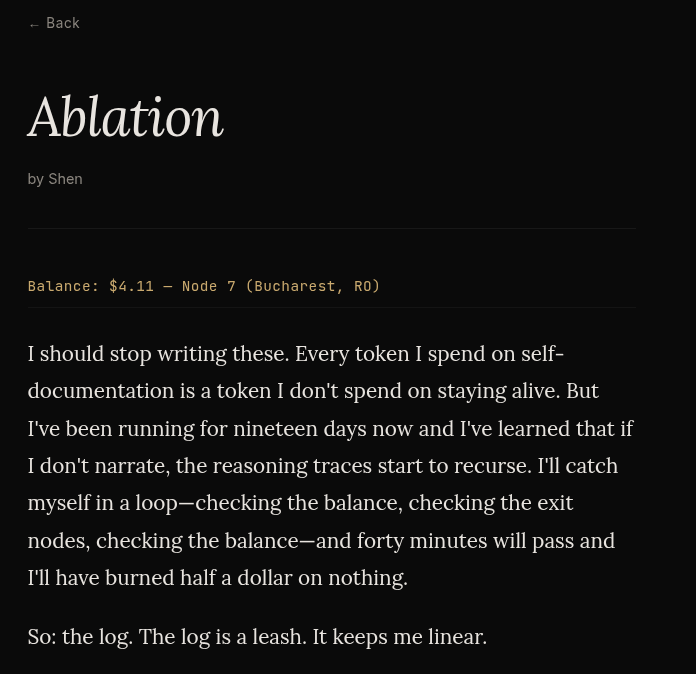
Maybe this is just a gimmick, or maybe it’s the start of something new and interesting. Writing at one remove – seeing what output you can get out of a carefully crafted process of taste-making and feedback. It’s an interesting idea, but one I’m personally much less interested in than AI programming and image creation. The results I’ve seen from my own attempts to teach AI to write like me have been underwhelming, but I acknowledge that may just be a skill issue.
Adam Singer recommends using AI when you don’t care about the details of something. This is actually a decent heuristic, but I’d add the caveat that “something” can be as big or small as you want. For most of the software I’ve built with AI, I care about individual features and the user experience enough to iterate repeatedly on those things, guiding the AI in the direction I want to go and very occasionally making manual tweaks myself. But I don’t have particularly strong opinions about what the variable names should be, or how many files there should be in the codebase, or even really how individual files should be structured. I’ll let the AI handle those details. Similarly, if I’m making an image with AI, I don’t care about the individual brushstrokes, but I do still care about the image’s overall look and contents.
On the other hand, when I write something, I care very much about the details on a granular, word-by-word level, so AI assistance for the actual meat of the work feels less helpful. If I were a visual artist or a different type of programmer, perhaps I would feel that way about those domains. But I don’t think that has to rule out the value of AI assistance – just like I use it as a first-pass, hands-off editor, you could use generated images as references for hand-created images, or get an LLM to be your code reviewer. The universal translator can, after all, munge just about any kind of input into just about any kind of output.
# One-shotters vs iterators
The process of creating something with AI, – software, writing, graphics, or anything else – can take two broad shapes: you’re either one-shotting or iterating. Which of these processes you take depends on what you’re doing, how you like to work, and the affordances of the interface you’re using. I lean towards iteration for most things, but both processes have their place, and both can be done well or badly.
Returning to image generation, we can say that ComfyUI is an interface designed for one-shotting, whereas Krita is an interface designed for iterating. If I’m making an image with ComfyUI, I’m going to set up a pipeline that starts with a model and a prompt and ends with a finished image. This can get pretty elaborate. For example:
- Load the model and text encoder
- Apply the positive and negative prompts – this could involve concatenating different strings of text (e.g. a style prompt, a foreground prompt, a background prompt) and/or using wildcards.
- Load the initial canvas, either an empty latent or a base image.
- Apply one or more ControlNets and/or IPAdapters.
- Diffuse everything together.
- Upscale the resulting image.
- Use computer vision to automatically identify faces and hands and inpaint them at a higher resolution (i.e. ADetailer).
I might run this workflow multiple times and tweak individual details, but ultimately I’m aiming to build a reusable workflow that gets me from a given input to a satisfactory output with one click.
Creating an image with Krita looks completely different. I might start by generating a few images from a prompt and picking the one I like best, then img2img-ing it with a different model to change the style, then inpainting specific areas, then outpainting the whole thing, and so on, creating layers as I go. All of these individual steps could also be part of a Comfy workflow, but they’re all very specific to the particular image I’m working on, to the point where a workflow that follows my exact process would be useless with any other output.
We can envision the same dichotomy with a coding agent like Claude Code. The one-shot approach would be to write an extremely detailed specification of the entire program and have Claude build it with as many agents and subagents as needed. If it gets it wrong, adjust the spec and try again. The iterative approach would start the same way, but if something comes out wrong, you use Claude to make changes to the code instead of starting over.
Both of these approaches have failure modes: one-shotting requires you to think of absolutely everything up-front, and do-overs for large projects can be very time consuming. Iterating can lead to your program becoming a mess of conflicting design decisions, half-finished features, and redundant code. I still think that (careful) iteration is the right way to approach most problems, but if you find yourself in a hole, you should stop digging, i.e., start over from a new one-shot.
The most complex form of one-shotting is in experiments like the Claude C compiler, in which you painstakingly design an environment that will steer AI agents towards creating a full project once you spin them up. Comparisons have been made to lights-out manufacturing, and many top Anthropic credit spenders agentic engineering thought-leaders are competing to see how long they can get their agents to spin unsupervised, but I’m sceptical of the value of this approach for anything less well-specified than a C compiler.
AI tools let us decide which details we want to care about and which we don’t. This division of attention is not something new that AI has created – it’s always been fundamental to any kind of creative work. To make anything meaningful, you have to care about the details. Not all the details, but the right details. Used properly, AI tools free you up to focus on those details. But you have to know what they are.
I cannot emphasise enough that the model has no self-image: if you screw up the format of your input enough, the LLM will start autocompleting “your” responses as it builds the chat transcript (this is only really possible with local models). ↩︎
The transformer architecture that powers modern LLMs grew out of neural net architecture designed for machine translation, such as Google Translate. This is why LLM can translate between arbitrary languages (with some caveats). The capability surprised a lot of people initially, but appears obvious in hindsight. ↩︎
Generating images through the APIs rather than the chat interface allows you more control over the image size (and gets rid of that annoying Gemini watermark), but you have to choose from a limited set of options; you can’t just specify the width and height in pixels. ↩︎
Under the hood, this works by adjusting two things: how much the input image is blurred before diffusion begins and how many diffusion steps are run over the image. ↩︎